Floor Management
Create, organize, and manage multiple floor levels
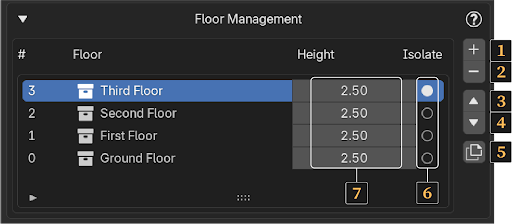
In this tab, you can manage the floors of your building. Each floor is listed here with its name and total height, which can be adjusted (7). You can also isolate a single floor to make editing easier using the Isolate option (6).
Note: The options in this tab become available after you've created at least one floor using the Space option in the Structure tab.
Floor Controls
-
Add a New Empty Floor – Create a new blank floor in your building.
-
Delete an Existing Floor – Remove a selected floor from the list.
-
Move Floor Up – Shift the selected floor one level up in the building structure.
-
Move Floor Down – Shift the selected floor one level down.
-
Duplicate Selected Floor – Clone the current floor. This is especially useful before adding interior spaces to the ground floor, since upper floors often share the same layout.